
Interviewers are asking about AI more than ever. Not because they want a list of tools you've used, but because they're assessing something deeper: your judgment.
How do you decide when to use AI? How do you verify what it produces? Can you explain your thinking clearly?
I've been on both sides of this conversation. I built Revarta almost entirely using AI tools—from code generation to content creation to workflow automation. Now I'm building AI agents at Arkero.ai. I've also conducted over 1,000 interviews at companies like Amazon, Google, Nvidia, Adobe, and Remitly.
Here's what I've learned: the candidates who impress aren't the ones claiming AI expertise. They're the ones who demonstrate how they think about AI—the prompting strategies, the verification habits, the judgment about when AI helps versus when it creates problems.
This guide will show you exactly how to talk about AI in interviews without sounding like everyone else.
Why Interviewers Are Asking About AI Now
Something shifted in hiring conversations around 2023. AI questions went from rare curiosities to standard interview fare—across every industry, not just tech.
What changed?
Companies realized that AI literacy is no longer optional. According to LinkedIn's 2024 Workplace Report, 75% of knowledge workers now use AI at work, but only 20% can articulate how they use it effectively.
That gap is what interviewers are probing.
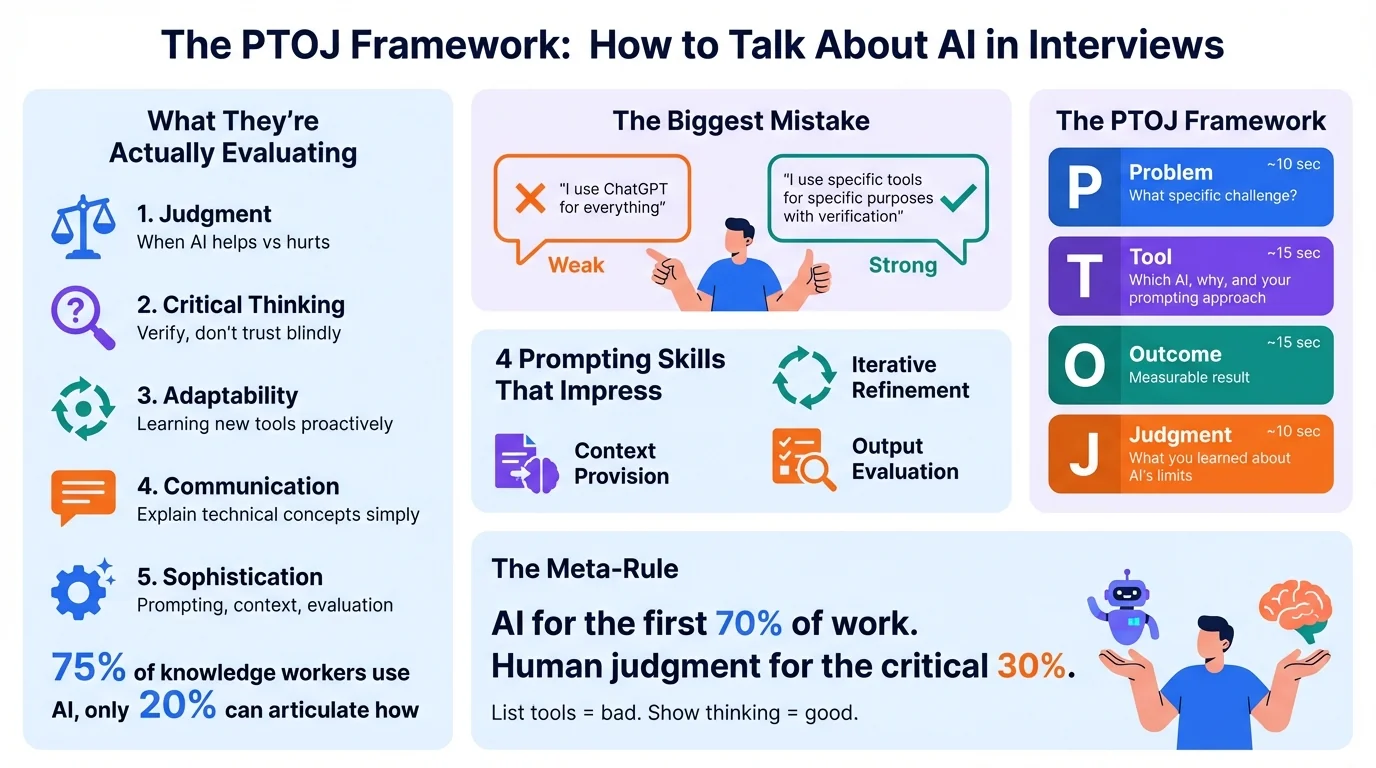
What They're Actually Evaluating
When interviewers ask about AI, they're not testing whether you know the difference between GPT-4 and Claude. They're assessing:
- Judgment - Can you identify when AI helps vs. when it hurts?
- Critical Thinking - Do you blindly trust AI outputs or verify them?
- Adaptability - Are you learning new tools proactively?
- Communication - Can you explain technical concepts simply?
- Sophistication - Do you understand prompting, context, and evaluation?
The Mistake Most Candidates Make
The biggest mistake? Treating AI questions like a tech competency quiz.
Candidates rattle off tool names: "I use ChatGPT, Copilot, Midjourney, Claude, Gemini..."
But listing tools tells the interviewer nothing. It's like saying "I use Microsoft Word" in 2005—everyone does.
What interviewers want: Specific examples of how AI improved your work, how you got AI to produce quality outputs, and evidence that you understand when NOT to use it.
The Framework: Problem, Tool, Outcome, Judgment
Here's a four-part structure that works for any AI-related interview question. Think of it as STAR method's cousin for technology questions.
P - Problem
What specific challenge or task were you facing?
"I needed to synthesize 15 competitor earnings calls into a strategic summary for our quarterly planning."
T - Tool
What AI tool did you use and why this one specifically? Include your approach to getting quality outputs.
"I used Claude because it handles long documents better than ChatGPT—its 200K context window meant I could feed entire transcripts without chunking. I structured my prompt with explicit output format, asked for direct quotes with page references, and ran the same analysis three times to check for consistency."
O - Outcome
What was the measurable result?
"Research that would have taken me 8 hours took 2 hours. More importantly, the structured prompting approach caught two competitive moves our team had missed in manual reviews."
J - Judgment
What did you learn about when AI works and when it doesn't?
"I learned that prompt structure matters more than tool choice. When I first tried this vaguely—'summarize these calls'—I got generic outputs. When I specified 'identify pricing changes, new product mentions, and executive tone shifts, with direct quotes'—the outputs became actionable. I also learned to always cross-reference AI-extracted quotes against originals; it got one attribution wrong, which I caught before presenting."
This framework works because:
- It shows business impact (not just tech knowledge)
- It demonstrates prompting sophistication (how you get good outputs)
- It proves you understand limitations (which builds trust)
- It's specific enough to be memorable and hard to fake
The Prompting Skills That Actually Impress
Here's what separates basic AI users from sophisticated ones—and what hiring managers are listening for:
1. Structured Prompting
Basic users type requests like they're texting a friend. Sophisticated users provide structure.
Basic: "Write me a competitive analysis of Salesforce"
Sophisticated: "Analyze Salesforce as a competitor to our CRM product. Structure your analysis as:
- Strengths (list 5, with evidence from their latest earnings call)
- Weaknesses (focus on mid-market segment complaints from G2 reviews)
- Threats to our business (be specific about features launching in next 6 months)
- Opportunities we could exploit
For each point, provide a confidence level (high/medium/low) based on source quality."
In an interview, you might say: "I've learned that AI outputs are only as good as the structure you provide. I use explicit formatting requests, ask for confidence levels, and specify the persona I want the AI to adopt—like 'analyze this as a skeptical CFO would' versus 'as an enthusiastic sales rep.'"
2. Context Provision
AI models have no memory between sessions and no knowledge of your specific situation. Sophisticated users know how to provide context efficiently.
In an interview, you might say: "One technique I've developed is creating 'context documents'—basically a one-page summary of our product, target customer, and key competitors that I paste into any strategic analysis request. This gives the AI grounding that transforms generic outputs into relevant ones. I also specify what the AI doesn't know: 'You don't have access to our internal metrics, so focus only on publicly available data.'"
3. Iterative Refinement
Amateur users take the first output. Sophisticated users treat AI interaction as a conversation.
In an interview, you might say: "I rarely accept the first output. My workflow is: initial prompt, critique what's missing, ask for specific improvements, then run a 'red team' pass where I ask the AI to find flaws in its own analysis. For important work, I'll run the same prompt through both Claude and GPT-4, then synthesize the differences—they often catch different things."
4. Output Evaluation
This is where most candidates fall short. Talking about how you evaluate AI outputs signals real sophistication.
In an interview, you might say: "I've developed personal 'evals' for different use cases. For research summaries, I spot-check 10% of cited facts against sources. For code, I run it through our test suite before even reading it. For writing, I check that claims match our actual data. The key insight: AI is confidently wrong often enough that systematic verification isn't optional—it's part of the workflow."
12 Common AI Interview Questions and How to Answer Them
These are the AI questions I hear most often in interviews across industries. For each, I'll show you what interviewers are really asking, plus weak and strong answer examples.
Question 1: "How do you use AI in your current role?"
What they're really asking: Do you have practical experience? Are you thoughtful about it or just using AI as a crutch?
Weak answer: "I use ChatGPT all the time. It helps me write emails, create documents, brainstorm ideas. I basically use it for everything."
Why it's weak: No specifics. "Everything" suggests no judgment about when AI is appropriate. Sounds like AI dependency, not AI literacy.
Strong answer: "I use AI at different points in my workflow, with different tools for different purposes. For research synthesis, I use Claude with structured prompts—I'll provide a specific output format and ask for quotes with page references so I can verify. For coding, I use Copilot for boilerplate but I've learned to be skeptical of its logic in complex functions; I treat its suggestions like code review comments, not finished code.
What I've learned is that the prompting approach matters more than the tool. Early on, I'd type vague requests and get vague outputs. Now I provide explicit context, specify the format I want, and run evaluation checks on anything important. My rule: AI for the first 70% of work, human judgment for the critical 30%."
Why it works: Shows tool awareness, prompting sophistication, and clear judgment about AI's role.
Question 2: "Walk me through a time AI helped you solve a problem."
What they're really asking: Can you tell a structured story? Do you understand the before/after impact?
Weak answer: "I was working on a presentation and used ChatGPT to help me write it. It gave me good content and the presentation went well."
Why it's weak: Vague. No specific problem. No process insight. Could be anyone's story.
Strong answer: "Last quarter, I needed to onboard to a new codebase with 50,000 lines of code and no documentation. My first approach—reading code linearly—was taking forever.
I switched to using Cursor with a specific prompting strategy. Instead of asking 'what does this code do,' I'd ask 'trace the execution path from this API endpoint through to the database, identifying each transformation' and 'what are the implicit assumptions this code makes about input data?' This forced the AI to give me architectural understanding, not just line-by-line explanation.
I also developed a verification habit: for any claim about code behavior, I'd write a quick test to confirm. The AI was right about 85% of the time, but that 15% would have burned me if I'd trusted blindly.
The result: I built a working mental model in 2 days instead of 2 weeks. More importantly, I documented my prompting approach so others could replicate it during onboarding."
Why it works: Specific prompting technique, verification process, measurable outcome, created reusable process.
Question 3: "How do you decide when to use AI vs. do something manually?"
What they're really asking: Do you have a decision framework? Can you prioritize?
Weak answer: "I use AI whenever it can help. If AI can do it faster, I use AI."
Why it's weak: No framework. Sounds like AI is a hammer and everything looks like a nail.
Strong answer: "I use a decision matrix based on two factors: error tolerance and context requirements.
For tasks with high error tolerance and low context needs—email drafts, meeting summaries, data formatting—AI is perfect. I can verify quickly and mistakes aren't costly.
For tasks with low error tolerance but still low context—like SQL queries or test generation—I use AI but with systematic verification. I run the code, I check edge cases, I never commit without understanding.
For anything requiring significant unstated context—strategic decisions, stakeholder communications, performance reviews—I stay manual. AI doesn't know our team dynamics, our unwritten rules, or what happened in last week's meeting. It can help me structure thinking, but the judgment has to be mine.
The shorthand: use AI for execution, humans for judgment. The sophistication is knowing where that line is for each task."
Why it works: Clear framework, specific examples per category, acknowledges nuance about context.
Question 4: "What's your approach to learning new AI tools?"
What they're really asking: Are you adaptable? Do you stay current without chasing every trend?
Weak answer: "I try to keep up with everything. I follow AI news, try new tools when they come out, and I'm always learning."
Why it's weak: Sounds unfocused. Doesn't demonstrate actual learning process.
Strong answer: "I separate 'monitoring' from 'mastering.' For monitoring, I follow a few curated sources and save anything that seems relevant. For mastering, I'm selective—I only go deep on tools that directly improve my work.
My learning approach for new tools: I start with a real project, not tutorials. I'll pick something I need to do anyway and try to accomplish it with the new tool. I pay attention to where I struggle—that's usually where the tool's paradigm differs from what I'm used to.
For example, when I started using Claude's new Projects feature, I noticed my outputs improved dramatically when I front-loaded context documents rather than putting everything in prompts. That insight came from experimentation, not documentation.
My filter for what to learn deeply: will this change my workflow in the next 90 days? If not, I bookmark it and move on."
Why it works: Clear learning strategy, specific example, practical prioritization.
Question 5: "How do you verify AI outputs?"
What they're really asking: Do you trust blindly or think critically?
Weak answer: "I read through what AI produces and edit anything that doesn't look right."
Why it's weak: Passive. Doesn't show a systematic approach.
Strong answer: "I've developed different verification protocols for different output types.
For factual claims: I use what I call the '10% audit.' I verify 10% of facts against primary sources. If that sample fails, I verify everything. This catches the AI hallucination problem—confident statements that are simply wrong.
For code: I never read AI code first. I run it through tests. If it passes, then I read it to understand. If it fails, the failure tells me where the AI went wrong. I've also learned to be especially careful with AI-generated error handling—it often handles the happy path well but misses edge cases.
For analysis and recommendations: I run a 'red team' prompt. I'll ask the AI: 'What would a skeptic say about this analysis? What assumptions am I making that might be wrong?' This surfaces weaknesses I might otherwise miss.
The meta-lesson: AI sounds confident whether it's right or wrong. My verification habits exist because that confidence is often misplaced."
Why it works: Specific techniques for different outputs, systematic approach, shows awareness of AI failure modes.
Question 6: "What limitations have you encountered with AI tools?"
What they're really asking: Do you understand AI isn't magic? Have you learned from failures?
Weak answer: "Sometimes AI makes mistakes or doesn't understand what I'm asking. You just have to be careful."
Why it's weak: Generic. Everyone knows AI makes mistakes. Doesn't show learning.
Strong answer: "I've catalogued several failure modes from experience:
Confident fabrication: AI cites papers that don't exist, invents statistics, and creates plausible-sounding false information. I had Claude cite a McKinsey study with specific percentages—entirely invented. Now I verify any specific claim before using it externally.
Context window amnesia: On long conversations, AI 'forgets' earlier context. I was debugging code and the AI suggested a fix that reintroduced a bug we'd discussed ten messages earlier. I now restart conversations for complex tasks rather than continuing indefinitely.
Pattern matching without understanding: AI often suggests solutions based on pattern similarity rather than actual understanding. I've seen Copilot suggest authentication code that looked right—similar patterns to what it had seen—but had subtle security vulnerabilities. Now I treat AI code suggestions like I'd treat code from a junior developer: good starting point, needs careful review.
The expertise illusion: AI sounds authoritative on everything, including topics where it should express uncertainty. I've learned to explicitly prompt 'what don't you know about this?' and 'rate your confidence on a scale of 1-10' to surface uncertainty."
Why it works: Specific failure categories with real examples, shows what was learned from each, demonstrates sophisticated understanding.
Question 7: "Tell me about a time you had to explain your AI use to skeptics."
What they're really asking: Can you communicate across different comfort levels with technology?
Strong answer: "When I started using AI for first-draft analysis, my manager was skeptical—concerned about accuracy and whether I was actually doing the work.
Rather than getting defensive, I showed her my process: the structured prompts, the verification steps, where I add human judgment. I offered to tag AI-assisted work for a month so she could compare quality.
The turning point was showing her my 'eval' spreadsheet—I'd been tracking AI accuracy across different task types. I could show her that for research synthesis, AI was 90%+ accurate after my verification; for specific recommendations, it was maybe 60% and required heavy editing.
That data-driven approach converted her from skeptic to advocate. She even asked me to present my prompting strategies to the team.
The lesson: skepticism about AI is often valid. Meeting it with evidence rather than enthusiasm builds trust."
Why it works: Acknowledges legitimate concern, shows data-driven approach, outcome demonstrates value.
Question 8: "How would you handle a situation where AI gave you wrong information?"
What they're really asking: Do you have error recovery processes? Do you take accountability?
Strong answer: "This happened more times than I'd like to admit early on. The worst: I used AI to pull key metrics from competitor earnings calls, and one revenue figure was wrong—$2M instead of $200K. I caught it in final prep because I do a verification pass before any external presentation.
But here's my real answer: I've built systems so I rarely face this situation in the first place.
First, I treat AI outputs as drafts, never finished work. Any important output gets verified before use.
Second, I've built 'evals' into my workflow—spot-checking 10% of factual claims, running code before reading it, cross-referencing analysis with primary sources.
Third, when I do find errors, I document them. I have a note file of 'AI failure modes' that I've encountered, which informs how I prompt and verify.
If an error did make it through to a stakeholder? I'd own it completely. AI doesn't make mistakes—people who use AI without verification make mistakes. The accountability is always mine."
Why it works: Honest about experience, shows systematic prevention, takes clear accountability.
Question 9: "What AI tools are you most proficient with?"
What they're really asking: What's your actual skill level, not just familiarity?
Strong answer: "I'd distinguish between tools I use daily and tools I've used for specific projects.
Daily: Claude and ChatGPT for analysis and writing—I've developed specific prompting patterns for different tasks. GitHub Copilot for code, though I've learned its strengths and weaknesses: excellent for boilerplate and test generation, needs heavy oversight for complex logic.
I've also built workflows that chain tools together. For example, when doing competitive research, I use Perplexity for initial fact-gathering since it cites sources, then Claude for synthesis since it handles nuance better, then I verify key claims manually.
What I want to be clear about: I'm a sophisticated user of AI tools, not an AI/ML engineer. I know prompting, evaluation, and workflow integration. I don't build the models. That distinction matters—I've seen candidates overclaim and lose credibility when interviewers probe deeper."
Why it works: Honest about level, shows workflow sophistication, doesn't overclaim.
Question 10: "Do you think AI could do your job?"
What they're really asking: Do you understand what's uniquely human about your work?
Strong answer: "Some parts, absolutely—and I've actively automated those parts.
AI handles my first drafts, research synthesis, code boilerplate, and meeting summaries. These tasks used to take 40% of my time. Now they take 15%, and the quality is often better because I'm editing strong drafts rather than creating from scratch.
What AI can't do: understand the unstated context of our business, navigate stakeholder relationships, make judgment calls when the right answer depends on factors AI can't see. When I'm deciding which project to prioritize, I'm weighing political dynamics, team morale, technical debt—things that exist in hallway conversations and Slack threads AI doesn't have access to.
My view: the future is AI-augmented humans, not AI-replaced humans. The professionals who thrive will be those who aggressively automate automatable work, freeing themselves for judgment-heavy work that requires context AI can't access.
I'm trying to be in that category."
Why it works: Nuanced view, shows self-automation, positions self as evolving with technology.
Question 11: "How do you stay ethical when using AI?"
What they're really asking: Do you think about broader implications?
Strong answer: "I follow four principles:
Transparency: If AI substantially contributed to work, I'm clear about it. I've added 'AI-assisted' notes to documents where AI did significant drafting. Not to diminish the work, but because accuracy about process builds trust.
Privacy: I assume anything I put into AI tools could be seen by others. No confidential company data, no personal information about colleagues, no proprietary strategies. I check data retention policies before using enterprise AI tools.
Verification before sharing: I never share AI outputs externally without verification. The cost of an AI error appearing in customer-facing material or stakeholder communications is too high.
Human decision authority: AI never makes final decisions in my workflow. Especially for anything affecting people—hiring inputs, performance feedback, resource allocation—AI might help me think, but the decision is mine to make and defend.
The meta-principle: I'm accountable for outputs regardless of what tools helped create them. AI doesn't absolve responsibility."
Why it works: Clear principles, specific applications, takes personal accountability.
Question 12: "Where do you see AI going, and how are you preparing?"
What they're really asking: Are you forward-thinking? Can you adapt to change?
Strong answer: "My view is that AI is moving from 'tool' to 'collaborator'—not replacing humans, but deeply integrating with how knowledge work happens.
Short-term, I'm building prompting skills and systematic evaluation habits. These transfer across tools—even as models improve, the skill of getting good outputs and verifying them will remain valuable.
Medium-term, I'm focused on skills AI struggles with: ambiguous problem definition, stakeholder navigation, cross-domain synthesis. I'm intentionally taking on projects that require these skills, not just projects I could outsource to AI.
Long-term—honestly, no one knows. But my bet is that human judgment in high-context situations will remain valuable precisely because AI can't access the context. Relationship history, organizational politics, unstated constraints—these shape real decisions and aren't in training data.
I'm also paying attention to AI agents—software that can take actions, not just produce outputs. I think the next wave will be less 'AI as research assistant' and more 'AI as teammate that executes tasks.' The skills shift there is learning to supervise and evaluate AI work at scale, not just in individual prompts."
Why it works: Timeframe structure, honest about uncertainty, specific preparation activities, shows awareness of emerging trends.
Role-Specific Examples with Prompting Sophistication
Different roles require different emphases when discussing AI. Here's how to tailor your answers with the sophistication that impresses:
Product Managers
Focus areas: Customer research synthesis, PRD drafting, competitive analysis
Strong example: "As a PM, my highest-leverage AI use is research synthesis. When interviewing 20 customers, I use a specific prompt structure: 'Analyze these transcripts. For each, identify: stated needs (explicit requests), unstated needs (implicit from context), objections raised, and emotional reactions (look for language intensity). Group across transcripts by theme, with representative quotes.'
This structured approach catches patterns I'd miss scanning manually. But I never let AI determine priorities—that requires understanding our roadmap, technical constraints, and business strategy that AI can't access."
Analysts and Data Roles
Focus areas: Code generation, data cleaning, pattern identification
Strong example: "In analytics, I use AI as a code accelerator with heavy verification. My workflow: describe the analysis goal, let AI suggest approach, then I evaluate whether the suggested method is statistically appropriate—not just whether the code runs.
I've learned to prompt for edge cases: 'What would happen if this column contains nulls? What if the date range includes weekends?' AI often writes code for the happy path; I force it to consider the messy reality of real data.
The interpretation and business recommendations always come from me. AI identifies patterns; humans decide which patterns matter."
Marketing and Content Roles
Focus areas: First drafts, research, ideation (NOT final voice)
Strong example: "For marketing, I use AI in a specific way: ideation and structure, not final voice. My prompt approach: 'Give me 10 angles for [topic], rated by controversy level' or 'Outline this piece with hooks for each section, targeting [specific persona].'
I never publish AI prose directly. I've found that if I give AI too much freedom, outputs sound generic. If I over-constrain, I might as well write it myself. The sweet spot is getting structure and options from AI, then bringing voice and insight myself.
The tell for AI-written marketing is sameness. AI produces perfectly competent, completely forgettable content. The human value-add is personality and unexpected connections."
Operations and Project Management
Focus areas: Meeting summaries, process documentation, stakeholder updates
Strong example: "In ops, I've built AI into my meeting workflow. I use transcription with a structured summary prompt: 'Identify: decisions made, action items with owners, open questions, and risks raised. For action items, infer deadlines from context where possible.'
The key skill is verification—I scan every action item to ensure AI captured nuance. 'We should probably eventually...' is different from 'We need this by Friday,' but AI sometimes conflates them.
For process documentation, I use AI to draft, then I reality-test with the team. AI documents the process as it should be; humans know the workarounds that actually happen."
Technical Roles (Engineering, Data Science)
Focus areas: Code generation, architecture decisions, documentation
Strong example: "For engineering, I use Copilot constantly but skeptically. My heuristic: the more complex the logic, the more carefully I review.
I've developed prompting patterns for different code tasks. For boilerplate: straightforward, minimal prompting. For complex logic: I prompt with explicit constraints—'handle null cases,' 'be thread-safe,' 'log errors to our standard format.' For debugging: I prompt the AI to explain the code's behavior, then ask 'what could cause [specific symptom]?' The explanation often reveals the bug.
What I never do: accept AI-generated code without understanding it. I've seen colleagues commit Copilot suggestions they couldn't explain, then struggle to debug when issues arose. If I can't explain the code, I don't commit it."
Advanced Concepts to Mention (That Impress Interviewers)
These concepts signal sophisticated AI literacy. Use them naturally in your answers:
Prompt Engineering
"I've learned that prompt structure matters more than eloquence. I use techniques like role prompting ('analyze this as a CFO would'), chain-of-thought prompting ('think through this step by step'), and few-shot prompting (providing examples of the output format I want)."
Evaluations (Evals)
"I run informal evals on AI outputs. For any new use case, I track accuracy for the first 10-20 instances. This tells me whether to trust that use case going forward and where to focus verification."
Context Windows and RAG
"I'm mindful of context window limits. For large documents, I chunk strategically rather than letting the model's attention degrade. For persistent knowledge bases, I've experimented with retrieval-augmented approaches—giving AI access to relevant documents at query time."
Temperature and Parameters
"I adjust generation parameters based on task. For factual research, I want low temperature—more deterministic outputs. For brainstorming, higher temperature generates more diverse options. Knowing when to adjust this is part of the skill."
Prompt Libraries
"I maintain a personal prompt library—proven prompts for recurring tasks. This consistency makes my workflow reproducible and my outputs more reliable."
What Not to Say: Common Mistakes
Mistake 1: "I use ChatGPT for everything"
Why it fails: Sounds like AI dependency, not AI literacy. Hiring managers worry you can't function without it.
Instead: Be specific about use cases and, importantly, what you don't use AI for.
Mistake 2: Over-claiming expertise
Why it fails: Saying you're an "AI expert" when you're a skilled user damages credibility. Interviewers often know more than you think.
Instead: Be precise about your level: "I'm proficient at prompting and integrating AI into workflows" is honest. "I understand ML deeply" is overclaiming unless you actually do.
Mistake 3: Being defensive about AI use
Why it fails: If you're sheepish about using AI, interviewers sense you're uncomfortable. This suggests either you're hiding something or you're not confident in your approach.
Instead: Be matter-of-fact. "Yes, I use AI extensively—here's my approach" is more confident than hedging.
Mistake 4: Generic tool descriptions
Why it fails: "ChatGPT is really helpful for writing" says nothing. Anyone could say this.
Instead: Be specific about your prompting approach, verification methods, and where you've found each tool works best.
Mistake 5: Ignoring limitations
Why it fails: Claiming AI is universally great signals you haven't used it seriously or you're not thinking critically.
Instead: Demonstrate sophisticated awareness: "AI excels at [X] but struggles with [Y], so I use it selectively."
The Skill That Actually Matters
Here's what most interview prep guides miss: Knowing what to say about AI is the easy part. Articulating it under pressure is the hard part.
You can memorize these frameworks. You can prepare specific examples. But when an interviewer asks an unexpected AI question, your brain goes blank and the polished answer disappears.
This happens because interviews are high-pressure situations. Your prefrontal cortex—responsible for articulate speech—gets hijacked by stress. The answer you rehearsed in your head comes out fragmented and uncertain.
The solution isn't more reading. It's practice.
Specifically:
- Out-loud practice: Speaking answers is different from thinking them
- Pressure simulation: Practice under conditions that mirror interview stress
- Feedback loops: Know what you're doing well and what needs work
Most interview prep treats AI questions as content problems. The real challenge is delivery.
Quick Reference: AI Interview Cheat Sheet
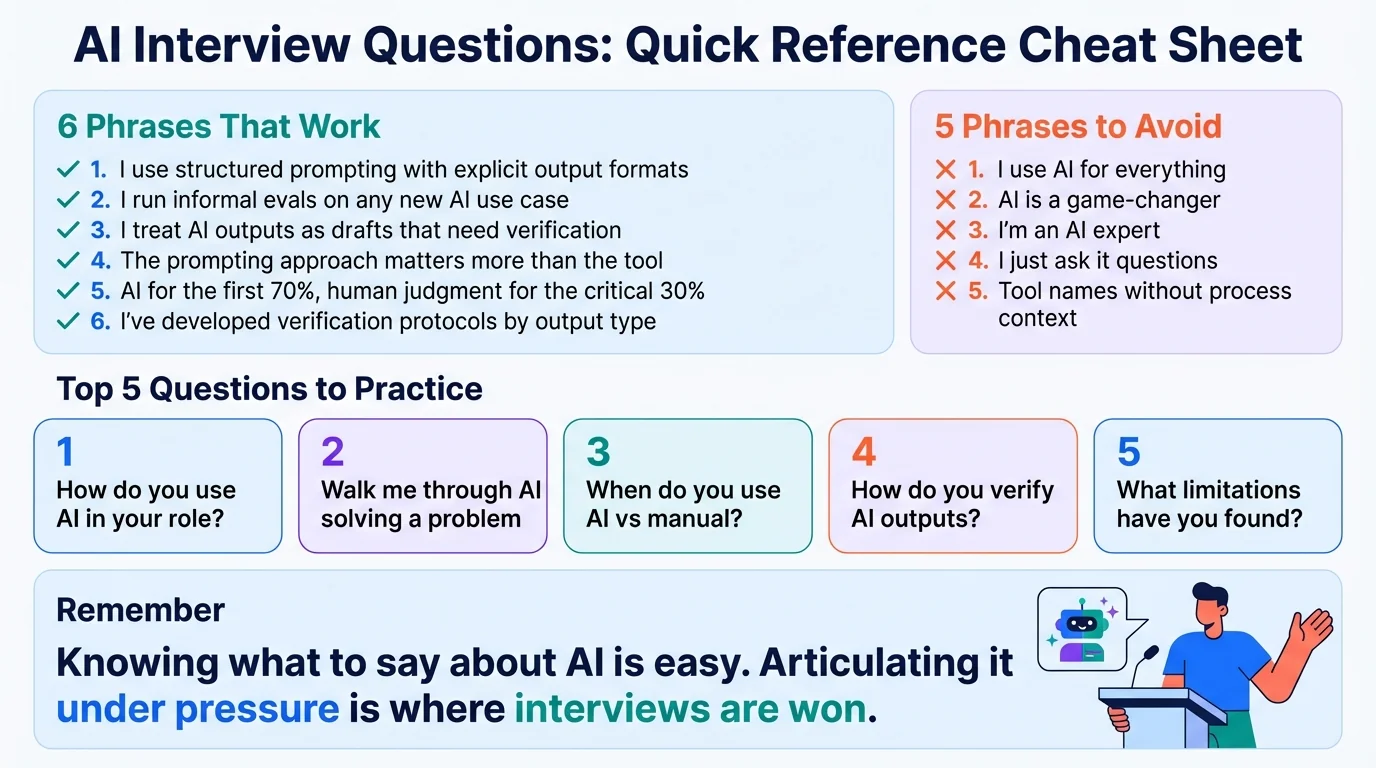
The PTOJ Framework
| Step | What to Include | Time |
|---|---|---|
| Problem | Specific challenge you faced | 10 sec |
| Tool | Which AI, why, and your prompting approach | 15 sec |
| Outcome | Measurable result | 15 sec |
| Judgment | What you learned about AI's limits | 10 sec |
10 Questions to Practice
- How do you use AI in your current role?
- Walk me through a time AI helped you solve a problem
- How do you decide when to use AI vs. do something manually?
- How do you verify AI outputs?
- What limitations have you encountered?
- How would you handle AI giving you wrong information?
- What AI tools are you most proficient with?
- Do you think AI could do your job?
- How do you stay ethical when using AI?
- Where do you see AI going?
Phrases That Work
- "I use structured prompting with explicit output formats"
- "I run informal evals on any new AI use case"
- "I treat AI outputs as drafts that need verification, not finished work"
- "The prompting approach matters more than the tool choice"
- "AI for the first 70%, human judgment for the critical 30%"
- "I've developed verification protocols based on output type"
Phrases to Avoid
- "I use AI for everything"
- "AI is a game-changer" (overused, meaningless)
- "I'm an AI expert" (unless you actually are)
- "I just ask it questions and use what it gives me"
- Tool names without prompting/verification context
Ready to Practice?
Knowing these frameworks is step one. Delivering them confidently under pressure is where interviews are won or lost.
Practice AI interview questions with voice-based feedback - experience the difference between knowing what to say and actually saying it well.
Related Resources
- AI Tools Interview Questions: How to Answer Without Sounding Generic - Tool-specific talking points
- Should I Mention Using AI in Interviews? - When to disclose and when to be careful
- Why ChatGPT Can't Prepare You for Interviews - The gap between writing answers and delivering them
- The Behavioral Interview Takeover - Why companies prioritize human skills
- STAR Method Mastery: 20+ Examples - Structure your stories for impact

